

Animal Print Mousepads for a Playful Desk Setup
Last Updated: October 24, 2026
Quick Summary
Animal print mousepads turn a plain workspace into a playful desk for the price of a coffee, and the panda, frog, sushi and monsters designs each bring their own personality. Every pad measures 18 x 22cm and 3mm thick with a non-slip rubber base, so the design is the real decision.
- Panda is the safest gift pick when you don't know someone's taste well.
- Frog suits people with a specific sense of humour and draws the most comments.
- Sushi brings bright, kawaii energy that suits students and gamers.
- Monsters is the loudest design and pairs well with colourful gaming setups.
- Clean with a soft damp cloth and mild soap, then air dry flat away from sunlight.
Table of Contents
- Why Animal Print Mousepads Make a Desk Feel Playful
- The Best Animal and Cartoon Print Designs, Ranked
- A Simple Mousepad Size Guide for Small Desks
- Glass, Lid and Straw Specifications: What to Check Before You Buy
- Making a Personalised Mousepad Gift They'll Actually Use
- How to Clean a Mousepad Without Fading the Print
- Matching Your Mousepad to the Rest of Your Desk
- Conclusion
- Frequently Asked Questions
Why Animal Print Mousepads Make a Desk Feel Playful
A desk should feel like yours, not like a grey slab you tolerate for eight hours. That's the whole idea behind animal print mousepads for a playful desk: a small, cheap swap that changes the mood of a workspace instantly. At per.si designs, a single panda or frog pad can do a lot for a desk corner.
The best animal print mousepads are the ones that make you smile before you've even opened your inbox. They're not a design statement you have to commit to for years, and they don't cost much either.
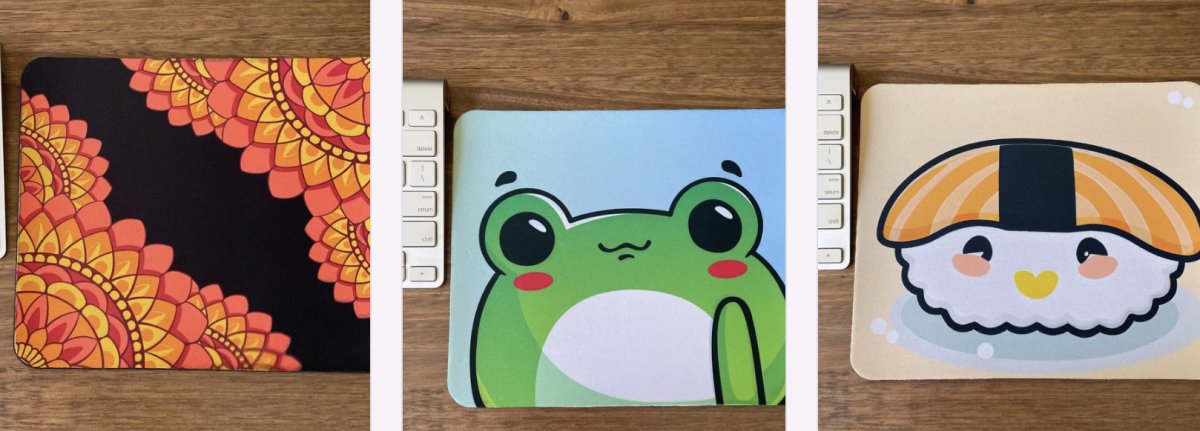
Here's what most guides miss: a mousepad is one of the few desk items you actually touch all day. That makes it the highest-return spot to add character. A cartoon print also hides the smudges and dust that show up fast on plain black pads.
The Best Animal and Cartoon Print Designs, Ranked
Ranking these comes down to personality, not specs. Every pad in our range measures 18 x 22cm and 3mm thick, with a non-slip rubber base and a smooth surface for precise mouse movement, so the design is the real decision. Here's how we'd rank them for pure desk joy.
Design |
Price |
Personality |
Best For |
|---|---|---|---|
Panda |
$11.00 |
Soft and crowd-pleasing |
Gifts, students |
Frog |
$11.00 |
Quirky and characterful |
Frog fans, kids |
Sushi |
$11.00 |
Kawaii and foodie |
Sushi lovers |
Monsters |
$11.00 |
Colourful and chaotic |
Gamers, kids |
1. Panda Mousepad: The Crowd-Pleasing Classic
Panda is the safest bet in the range, and that's a compliment. The cartoon panda design suits almost anyone, which makes it the pad we'd reach for first when buying a gift for someone whose taste we don't know well. It's cute without being loud, and it works just as well on a student's homework desk as it does in a home office.
2. Frog Mousepad: Quirky and Full of Character
Frog is the one for people with a specific sense of humour. The cartoon frog design brings a bit of nature and a lot of charm, and it tends to be the pad that gets the most comments from visitors. If you know someone who loves frogs, this is a no-brainer. See the frog mousepad if that's your person.

3. Sushi Mousepad: Kawaii Desk Energy
Sushi is the kawaii option, and it's genuinely fun. The kawaii-inspired sushi design is bright, playful and a little bit silly, which is exactly the point. It suits students, gamers and anyone who wants their desk to feel less corporate. Browse the sushi mousepad to see the artwork up close.
4. Monsters Mousepad: Colourful and Chaos-Friendly
Monsters is the loudest of the four, in the best way. The colourful monster design brings playful, quirky energy to a workspace, and it pairs well with a colourful keyboard or a gaming setup. It's a great pick for kids and anyone who likes their desk a little chaotic.
A Simple Mousepad Size Guide for Small Desks
The short answer: 18 x 22cm is the sweet spot for a small desk. That's the size of every pad in our range, and it comfortably fits a mouse with room to move without swallowing your whole desktop.
A mousepad size guide gets complicated fast when you look at giant desk mats, but most people don't need one. Here's the quick version, with the numbers that actually matter:
- Small desks (under 100cm wide): an 18 x 22cm pad leaves room for a keyboard and a notebook. You want at least 25cm of clear width beside your keyboard before a compact pad fits comfortably.
- Standard desks (100-140cm): the same pad works fine, and you can add a wrist rest alongside it. Leave 5-10cm between the pad edge and your keyboard so your wrist doesn't catch the seam.
- Gaming setups: a larger mat may suit low-sensitivity play, but a compact pad is easier to reposition and takes up less of your mouse arm's travel.
How much mouse travel do you actually need?
A mouse needs roughly 15-20cm of horizontal travel for everyday office work at moderate sensitivity. An 18cm-wide pad gives you that with a small margin, which is why it suits most people. If you play shooters at low sensitivity, you'll want a wider surface, but that's a gaming decision, not a desk-space one.
Three fit checks before you buy
- Measure the gap beside your keyboard. If it's under 25cm, a compact pad is the right call; anything wider will crowd your typing space.
- Check your mouse's footprint. Most standard mice are 6-7cm wide, so an 18cm pad leaves 11-12cm of travel, enough for cursor work, tight for fast flicks.
- Account for the 3mm thickness. A 3mm pad sits flush enough that your wrist won't notice the step from desk to pad, but it does raise your mouse slightly; if you use a low-profile wrist rest, check the heights match.
Glass, Lid and Straw Specifications: What to Check Before You Buy
A mousepad has no glass, lid or straw, so this one's about the drinkware sitting next to it. If you're building a coordinated desk, the tumbler you use for iced coffee matters as much as the pad underneath it.
When you're checking a frosted glass can or can-shaped glass cup, look at four things:
Customisable Mousepad - Add your Own Design →
- Size: 16 oz and 20 oz are the common can-shaped sizes. A 16 oz glass suits a small desk; 20 oz holds more but takes up more room.
- Lid fit: check the lid seals properly, especially if the cup sits near your keyboard.
- Straw type: reusable straws vary in width, and a wider straw suits thick iced coffee drinks better.
- Frosted exterior: a frosted tumbler keeps cold drinks colder for longer and hides condensation marks.
The Australian Competition and Consumer Commission product safety guidance is worth a read on labelling and safety claims before you buy drinkware online. Match your cup size to your pad size and the corner stays tidy.
Making a Personalised Mousepad Gift They'll Actually Use
A personalised mousepad gift beats most generic presents because it gets used every single day. Upload a photo, a logo, a quote or a design, and we print it onto an 18 x 22cm pad with a non-slip base.
The process is simpler than most people expect:
- Choose a clear, high-resolution JPG or PNG, ideally 2-10MB.
- Avoid screenshots or compressed images, which can print blurry.
- Upload your file and we handle the rest.
- Allow 2-5 days for production, sometimes longer in peak holiday periods.
Create a custom mousepad with your own design if you've got a photo or quote in mind. If you're still hunting for ideas, our round-up of personalised gift ideas has plenty more.

How to Clean a Mousepad Without Fading the Print
Knowing how to clean a mousepad properly is the difference between a print that lasts and one that fades within months. The good news: it takes about two minutes and no special products.
- Wipe the surface with a soft, damp cloth and a drop of mild soap.
- Avoid harsh chemicals, bleach and abrasive sponges.
- Don't soak the pad or put it in the washing machine.
- Air dry flat, away from direct sunlight and heaters.
- Shake out crumbs weekly and give it a deeper clean monthly.
Our pads use a non-slip rubber base and a smooth surface, so a gentle wipe keeps the print sharp. The Good Housekeeping guide to caring for printed fabrics covers similar principles for keeping colour vibrant.
Matching Your Mousepad to the Rest of Your Desk
Matching comes down to one rule: pick your anchor colour first. If your pad is the panda or frog design, keep the rest neutral so the print stands out. If you've gone for monsters or a geometric pad, echo one colour from the design in a pen pot or cable tidy.
A few pairings that work:
- Panda or frog: white, timber and soft green accessories.
- Sushi: warm neutrals with a pop of red or pink.
- Monsters: bold primaries, and don't be afraid to clash on purpose.
- Geometric pads: cool blue-greens or warm orange, matched to the print.
The Design Council's guidance on colour in product design explains why a single accent colour reads as intentional rather than messy. One accent is enough.
Conclusion
The hardest part of a playful desk isn't finding a cute pad. It's stopping at one. A single animal print mousepad changes the whole feel of a workspace for the price of a coffee, and it's the easiest gift you'll buy all year.
At per.si designs, we make personalised products and gifts with custom design options available on request, all shipped from Melbourne. Browse our range of animal and cartoon mousepads, or send us your own artwork for something truly one-off. Check out the latest arrivals and give your desk a bit of personality.

Frequently Asked Questions
What animal print mousepad looks best on a desk?
It depends on the desk's existing colours. A panda or frog design in soft greens and blacks sits well with timber and white surfaces, while the monsters and sushi designs suit brighter, more playful setups. If your desk is already busy, pick one hero print and keep everything else neutral. The 18 x 22cm size means the print stays a focal point rather than taking over the whole surface.
Can you personalise an animal print mousepad as a gift?
Yes. The customisable mousepad at per.si designs lets you upload your own design, logo, quote or photo, and it costs $14.00. Upload a high-resolution JPG or PNG between 2 and 10 MB, and avoid screenshots because they print blurry. Production takes 2 to 5 days, sometimes longer in peak holiday periods, so order ahead if you need it for a birthday.
How do you clean a printed mousepad without damaging the design?
Wipe the surface with a soft cloth dampened with mild soapy water, then let it air dry completely before use. Avoid soaking the mousepad, scrubbing with abrasive pads, or using bleach and alcohol-based cleaners, which can dull the print. The non-slip rubber base should stay flat, so don't wring or twist it. A quick weekly wipe keeps dust and coffee marks from settling into the surface.
Are animal print mousepads suitable for everyday use?
Yes. Each mousepad measures 18 x 22cm and is 3mm thick, with a non-slip rubber base and a smooth surface for precise mouse movement. That makes them fine for daily work, study and gaming.
